
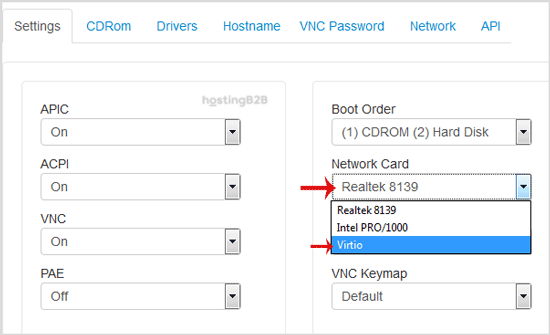
You can change your network card to any other network card in SolusVM. For example, from Realtek to Virtio or Intel Pro. VirtIO is recommended for best performance on our VPS hosting plans.
VirtIO is the card we recommend for KVM performance. HostingB2B KVM VPS plans include full root access and a dedicated IP, and we recommend VirtIO for the virtual network card. Plans start at €30.00/month on the VPS page.
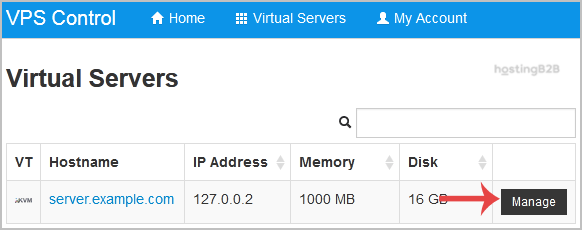
1. Login to your SolusVM Control Panel.
Want VirtIO on a KVM VPS you control? HostingB2B VPS plans start at €30.00/month, with full root access and a dedicated IP.
2. If you have multiple VPS, select the appropriate one.

VPS plans with full root access
Live monthly list prices from the HostingB2B VPS hosting page. Business is marked Recommended there. Each plan includes full root access and a dedicated IP.
VPS Starter
2 GB RAM, full root access
€30.00 /month
- vCPU · 2 cores
- RAM · 2 GB
- Disk · 64 GB SSD
- Bandwidth · 2 TB/month
- Access · Full root, dedicated IP
MOST DEPLOYED
VPS Business
4 GB RAM, full root access
€45.00 /month
- vCPU · 4 cores
- RAM · 4 GB
- Disk · 128 GB SSD
- Bandwidth · 2 TB/month
- Access · Full root, dedicated IP
VPS Pro
8 GB RAM, full root access
€70.00 /month
- vCPU · 4 cores
- RAM · 8 GB
- Disk · 128 GB SSD
- Bandwidth · 3 TB/month
- Access · Full root, dedicated IP
3. Scroll down, and under the settings tab, you can find the Network Card option. Select the appropriate network card from the Drop-Down Menu.

Have a question about VPS network cards or VirtIO? Chat with HostingB2B support on Telegram.
4. Reboot your VPS.
Now you know how to change the network card of your VPS in SolusVM.
Get a KVM VPS ready for VirtIO
Choose a live KVM VPS plan with root access, or talk to us about the right size for your workload.