How to create a Feature list in WHM??
You can add a Feature List from your WHM Account. Feature lists allow you to provide a customized plan with specific features only.
A custom feature list only helps if you have WHM in your hands. HostingB2B KVM VPS plans include full root access and a dedicated IP, so you can open WHM and create a feature list for the packages you sell. Plans start at €30.00/month on the VPS page.
1. Login to your WHM Account.
2. Go to Packages >> Feature Manager or type Feature Manager in the search box, and the option will appear. Click on it.
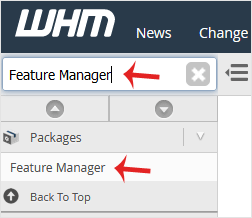

Need WHM Feature Manager on a server you control? HostingB2B KVM VPS plans include full root access and a dedicated IP, from €30.00/month.
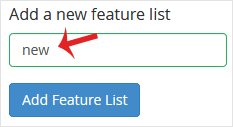
3. In Add a new feature list field, enter the name of your feature list then click on the Add Feature List button.
VPS plans with full root access
Live monthly list prices from the HostingB2B VPS hosting page. Business is marked Recommended there. Each plan includes full root access and a dedicated IP, so WHM Feature Manager is under your control.
VPS Starter
2 GB RAM, full root access
€30.00 /month
- vCPU · 2 cores
- RAM · 2 GB
- Disk · 64 GB SSD
- Bandwidth · 2 TB/month
- Access · Full root, dedicated IP
MOST DEPLOYED
VPS Business
4 GB RAM, full root access
€45.00 /month
- vCPU · 4 cores
- RAM · 4 GB
- Disk · 128 GB SSD
- Bandwidth · 2 TB/month
- Access · Full root, dedicated IP
VPS Pro
8 GB RAM, full root access
€70.00 /month
- vCPU · 4 cores
- RAM · 8 GB
- Disk · 128 GB SSD
- Bandwidth · 3 TB/month
- Access · Full root, dedicated IP
4. Tick options that you wish to add to your feature list or tick the Select all features option to enable all features and then click the Save button.
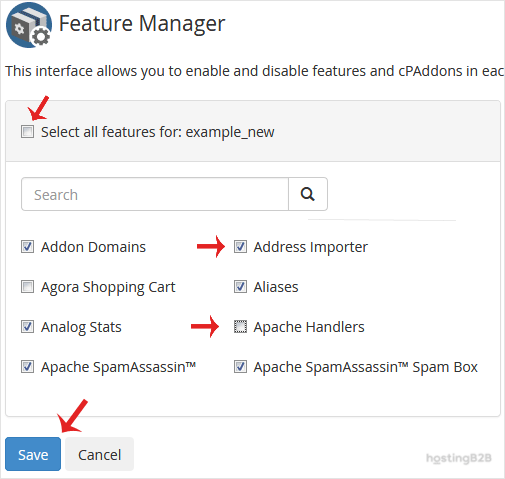

Have a question about WHM feature lists or VPS root access? Chat with HostingB2B support on Telegram.
Congratulations, you have successfully created your feature list in your WHM Account.
Read more about WordPress from our Knowledgebase Blog Articles
Get a VPS with WHM root access included
Choose a live KVM VPS plan with root access, or talk to us about a dedicated server if you need more than a VPS for your reseller packages.
The post Create a Feature list in WHM appeared first on HostingB2B.