You can use CloudLinux’s Select PHP Version to change your website’s PHP Version. CloudLinux provides various PHP Versions to choose from. Let’s see how you can change the PHP Version Via CloudLinux selector in Plesk.
Switching PHP in Plesk is easier when CloudLinux Selector ships with the plan. HostingB2B web hosting plans include CloudLinux PHP Selector in Plesk. Live monthly prices start at €5.99. At the time these boxes were built, the plans were labelled Out of stock, so the buttons go to the product page.
1. Log in to your Plesk account.
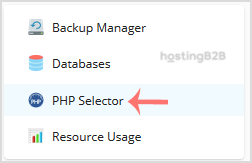
2. In the right-hand sidebar, click on PHP Selector.

Need a plan with CloudLinux PHP Selector in Plesk? HostingB2B web hosting includes the selector this guide walks through.
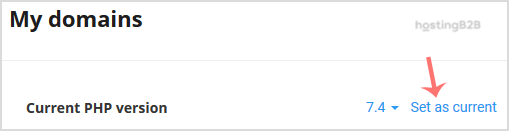
3. In the front of the Current PHP version, click on the drop-down menu and choose the version you wish to use.

Web hosting plans (live prices)
These are the live monthly prices on the HostingB2B web hosting page. Power is marked Recommended there. At the time these cards were built, the page labelled the plans Out of stock, so each button goes to the product page rather than a checkout URL.
Web Hosting ECO
Start slow, grow fast
€5.99 /month
- Websites · 1
- Email · 1 address
- Storage · 1 GB SSD
- Bandwidth · 10 GB/month
- SSL · Free SSL
MOST DEPLOYED
Web Hosting Power
Web hosting for business
€18.00 /month
- Websites · 5
- Email · 5 addresses
- Storage · 5 GB SSD
- Bandwidth · 50 GB/month
- SSL · Free SSL
Web Hosting Pro
Hosting for growing sites
€24.99 /month
- Websites · 10
- Email · 10 addresses
- Storage · 10 GB SSD
- Bandwidth · 100 GB/month
- SSL · Free SSL
4. Click Set as current.

Have a question about PHP versions in Plesk or web hosting? Chat with HostingB2B support on Telegram.
Read more in our blog page.
Host the site on a plan with CloudLinux PHP Selector
Review the live web hosting plans and current availability, or ask our team which plan fits the PHP versions your site needs.
The post Change the PHP Version Via CloudLinux selector in Plesk appeared first on HostingB2B.