

Upload files via the cPanel File Manager
If you don’t want to use a 3rd party FTP Software, you can use the cPanel’s inbuilt File Manager. This feature is available on all our web hosting plans and provides a browser-based interface for managing your website files.
1. Log into your cPanel account.
Need to upload files quickly and easily?

With HostingB2B’s user-friendly cPanel hosting, managing your website is a breeze!
Check out our packages!2. In the Files section, click on the File Manager Icon.
3. cPanel File Manager will be open.
4. Navigate to the directory where you want to upload your files. For example, should you wish to upload your file to the public HTML folder, you need to go to /public_html first. On the left side, you can see a list of directories. Double Click on the public_html folder.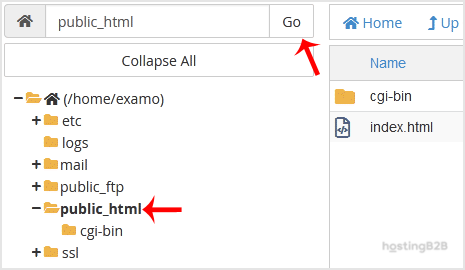
5. Now click on the Upload icon.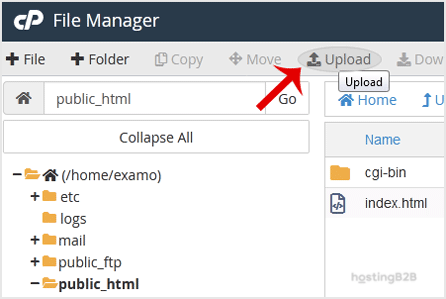
6. Click on the Select File button and select the file you want to upload from your PC. After you have selected the file, the upload process will begin automatically.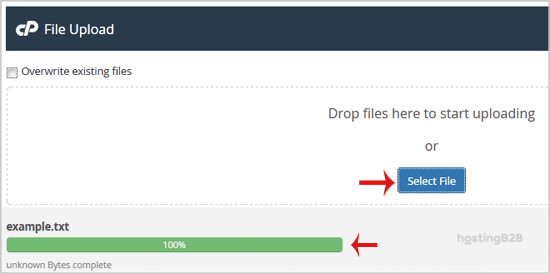
Read more about cPanel from our Knowledgebase Blog Articles
- How to access cPanel Web Disk
- How to create cron-job via cPanel
- How to reset your cPanel Account Password
- Generate and download a full cPanel backup
Round-the-Clock Support
Our certified experts are always available to resolve issues, ensure compliance, and maintain performance. For more information, contact our experts!
For larger file transfers or automated deployments, you may prefer using a dedicated FTP client like FileZilla. Always ensure your connection uses SFTP or FTPS with a valid SSL certificate to encrypt file transfers. If you need assistance with file management, migration, or server configuration, our managed services team is available 24/7.








