
Apache SpamAssassin is a mail filter that identifies spam. It is an intelligent email filter that uses a diverse range of tests to identify unsolicited bulk email, more commonly known as spam. These tests examine email headers and content to classify email with advanced statistical methods. SpamAssassin is included with all our web hosting and email hosting plans that include cPanel.
1. First login to your cPanel Account.
2. Then in the Email section, click the Spam Filters Icon.


3. After that toggle Process New Emails and Mark them as Spam to enable it. If the knob/toggle is showing in grey color, it means the Apache SpamAssassin is disabled, and you need to enable it.

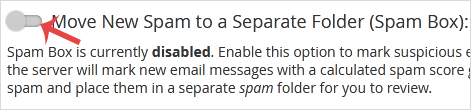
4. Finally you can enable SpamBox by clicking on Move New Spam to a Separate Folder (Spam Box).
Now, whenever you receive a spam message with a spam score of 5 or more, the spam email will be automatically removed by Spam Assassin.
Congratulations you have successfully enabled Apache SpamAssassin and SpamBox in cPanel. For more granular control over incoming mail, you can also create user-level email filters to sort, forward, or discard messages based on custom rules. To further protect your email infrastructure from external threats, pair SpamAssassin with DDoS protection and an SSL certificate for encrypted mail transport.








