
You can use CloudLinux Selector to enable or disable the allow_url_fopen directive in DirectAdmin. This PHP setting controls whether PHP can access remote files via URL — disabling it is a common security hardening step on web hosting accounts.
1. First log-in to your DirectAdmin account.
2. Then in the Extra Features section, click on the Select PHP version icon or type Select PHP in the navigation filter box. The option will appear. Click on it.


3. After that click on the Options menu.

Note: If the Options page shows an error related to the native PHP version, change it to a non-native version first.
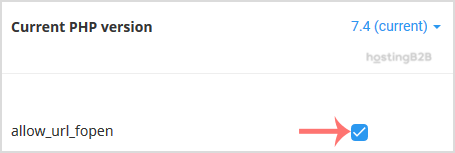
4. Finally to enable allow_url_fopen, tick mark it. To disable it, uncheck it.
You have learned how to enable or disable allow_url_fopen using Cloudlinux Selector in DirectAdmin. For related PHP settings, see how to enable/disable display_errors or change your PHP version in DirectAdmin.








