
You can redirect your addon domain to another domain in cPanel. Domain redirects are useful for consolidating sites or pointing parked domains to your main web hosting site.
1. First log into your cPanel account.
2. After that go to the Domains section and click on the Addon Domains icon.


3. Then under Modify Addon Domain, locate the add-on domain and click on Manage Redirection.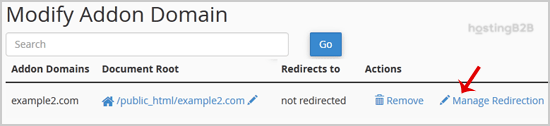
4. You can now enter the link to which you wish to redirect the add-on domain in the available text box.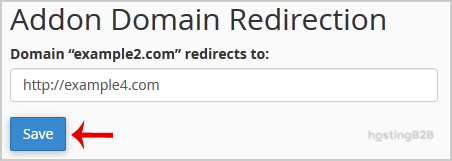
5. Finally click Save.
You have successfully redirected your Addon domain via cPanel. For more advanced redirect techniques, see our .htaccess redirect guide. To manage your subdomains, learn how to create a subdomain in cPanel. If you need to register a new domain, visit our domain registration page.








