
You can include or exclude your domain from AutoSSL in cPanel. AutoSSL provides free SSL coverage, but for higher validation and trust levels, consider our SSL certificates.
If your domain is newly created, wait for a few hours, so cPanel can automatically install an SSL on your domain. However, if an SSL is not installed on your domain even after 24 hours, first check the last log of AutoSSL from cPanel >> SSL/TLS Status >> Certificate Status.
1. Firstly log into your cPanel account.

2. Then in the Security section, click on the SSL/TLS Status icon.
3. Under domains, choose the domain you wish to include and then click on the “Include x domain(s) during AutoSSL” button. Your selected domain/sub-domains will be included in AutoSSL.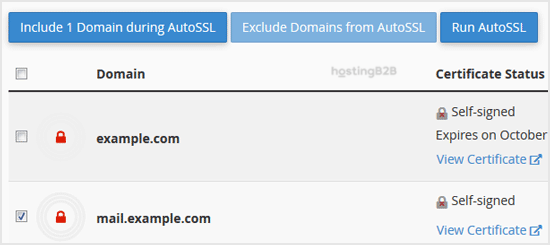
4. Later, should you wish to exclude your domain, click on the “Exclude x domains during AutoSSL” button. Your selected domain/subdomains will be excluded during AutoSSL.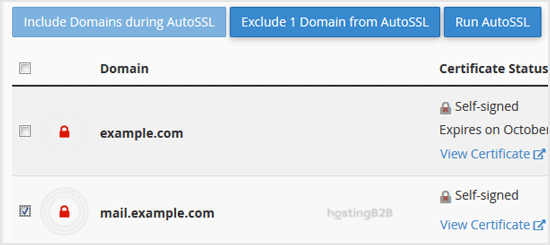
Note: Only domains included by you can be excluded. It means you cannot exclude domains unless they are added to the inclusion option by you.
This feature is available on all our web hosting plans.








