
A guide to help you install SMF (Simple Machines Forum) via Softaculous in SiteWorx. SMF is a powerful, community-driven forum platform that runs efficiently on our web hosting plans with SiteWorx and Softaculous pre-installed.
1. Log into your SiteWorx account. (e.g. www.example.com:2443/siteworx/ )
2. Then under SiteWorx Menu, click the Hosting Features menu item if it is not already open.

3. Then click on the Softaculous option.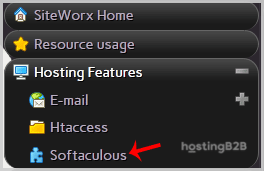
4. After that SiteWorx will open a Softaculous Interface.
5. On the left side of your screen, you should locate the Forums category. Click on it and then click on the SMF link that will appear.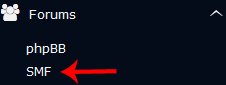
6. Then click on the Install button.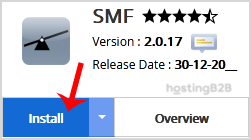
7. Fill the necessary field under the Software Setup field:
- Choose Installation URL: Choose the appropriate protocol/domain. Inside the “In Directory” field, should you want to install this in a directory, i.e., example.com/directory, enter the directory name. Otherwise, leave it blank to install in your main domain, i.e., example.com
8. Enter the following details under the Board Settings field:
- Board Name: Name of the forum.
- Visual verification image to display: Useful for spam prevention.
- Board E-mail: The e-mail address of the forum.
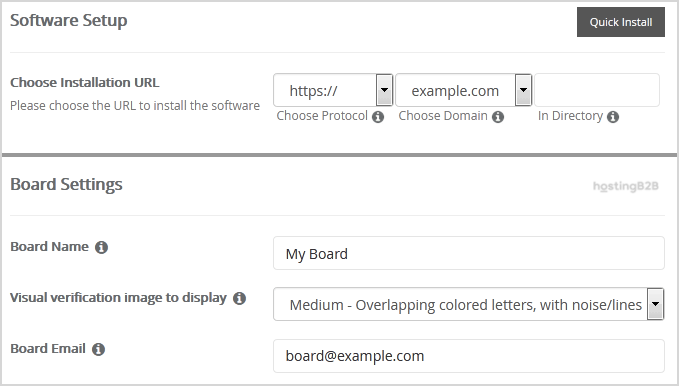
9. Then under the Admin Account field, enter the following information:
- Username: Your new SMF username (for security reason do not use the Administrator or the Admin username.)
- Password: Use a strong password.
- Real Name: Leave this as it is or enter your real name.
- Email: Your e-mail address.
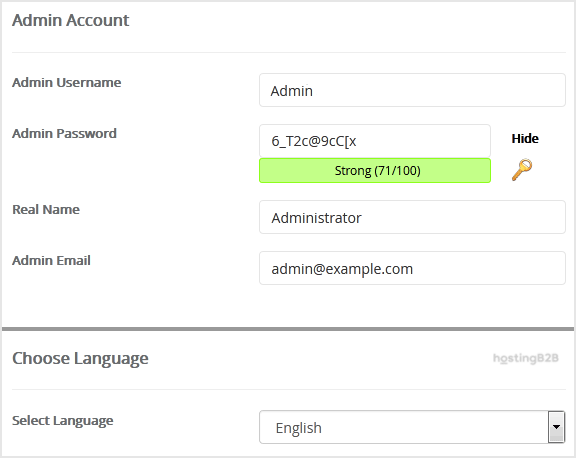
Note: Copy the admin username and password on a notepad because you will need these login details to access the admin area of your SimpleMachine(SMF) Forum.
10. Enter the following details under the Choose Language field:
- Select Language: The default language of the forum is English.
11. Advanced Options: Leave this as it is unless you want to change the database name or take an automated backup. Please note that taking frequent backups may take a lot of disk space.
Finally, scroll down to the end of the page and click on the Install button.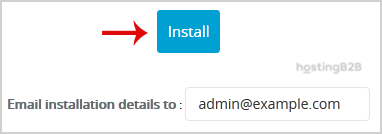
Congratulations you have installed SMF simplemachine via Softaculous in SiteWorx. Secure your forum with an SSL certificate and consider DDoS protection for high-traffic community forums. For other SiteWorx installations, see how to access Softaculous in SiteWorx.








