

A guide on how to remove an Addon domain in cPanel. Managing addon domains is a core feature of our web hosting plans.
1. Log into your cPanel account.
2. In the Domains section, click on the Addon Domains icon.

3. Locate the addon domain under Modify Addon Domain and then click on the Remove link.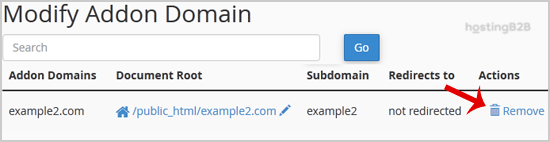
4. Click on the Remove button once more.
You should see a success message notifying you that your Add-on domain has been completely removed.
You have successfully removed an Addon domain via cPanel. Before removing domains, we recommend downloading a full cPanel backup first. If you need to redirect the domain instead, see our guide on redirecting an addon domain. To register a new domain, visit our domain registration page.








