You can create a new email address from SiteWorx. HostingB2B email hosting includes SiteWorx, so you can add mailboxes from the control panel.
To create a new e-mail address in SiteWorx, perform the following steps:
1. Log into your SiteWorx account. (e.g. www.example.com:2443/siteworx/ )
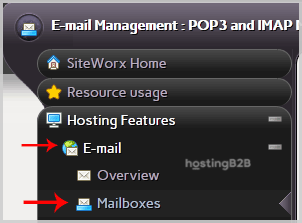
2. Under SiteWorx Menu, click the Hosting Features menu item if it is not already open.

Have a question about creating an email account in SiteWorx? Chat with our support team on Telegram.
3. Click the E-mail menu item and then click on the Mailboxes option.
4. Under the “Add an E-mail Box” tab, enter the e-mail address that you wish to create, such as my-first-email.
Prefer WhatsApp? Chat with HostingB2B about creating an email account in SiteWorx.
5. Click on the Add button.

Host email with HostingB2B
Review HostingB2B email hosting, or talk to us if you need help setting up mailboxes in SiteWorx.
Once your e-mail account is created, it will appear under the Existing E-mail Boxes tab.

Visit our blog for more knowledgebase articles !
The post How to Create an E-mail account in SiteWorx? appeared first on HostingB2B.