SolusVM can email you each time someone logs in. HostingB2B VPS hosting includes SolusVM, so you can turn the login alert on or off from My Account without a support ticket.
Whenever you log in to your VPS control panel, you will receive a login email alert. You can disable this function from the SolusVM. However, we recommend that you enable the feature for security reasons. SolusVM is included with all our VPS hosting plans.
1. Log in to your SolusVM Control Panel.

Have a question about SolusVM login alerts? Chat with our support team on Telegram.
2. If you have multiple VPS, select the appropriate one.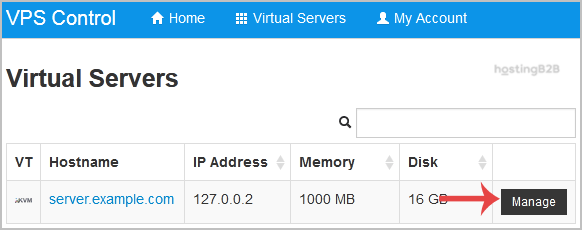
3. From the Top Bar Menu, click on My Account.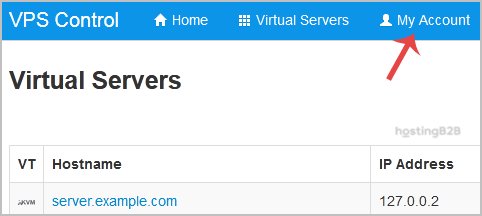
Prefer WhatsApp? Chat with HostingB2B about SolusVM login alerts.
4. Under Account Settings, you can find a Login Alert option. If you wish to disable it, unmark the option. Alternatively, if you want to enable it, checkmark the option.

Manage the VPS with HostingB2B
Review HostingB2B VPS hosting, or talk to us about a plan with SolusVM access and the login alerts you want left on.
Now you know how to enable or disable SolusVM Login Alert.