
You can change the VNC password using Virtualizor.
A new VNC password only helps if you can still reach the panel. HostingB2B KVM VPS plans include full root access, a dedicated IP and Virtualizor, so you can change the VNC password and reconnect after a reboot. Plans start at €30.00/month on the VPS page.
1. Log in to your Virtualizor Control Panel.
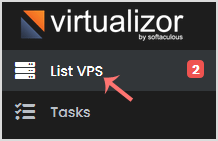
2. In the left side panel, click on List VPS.

Need a VPS where you can reset VNC yourself? HostingB2B KVM plans include Virtualizor, so this password change is in your control panel.
3. Hover your mouse on the appropriate VPS, and that line will be highlighted. Then click on the Manage icon in the highlighted line.

VPS plans with Virtualizor and VNC
Live monthly list prices from the HostingB2B VPS hosting page. Business is marked Recommended there. Each plan includes full root access, a dedicated IP and Virtualizor, including HTML5 VNC.
VPS Starter
2 GB RAM, full root access
€30.00 /month
- vCPU · 2 cores
- RAM · 2 GB
- Disk · 64 GB SSD
- Bandwidth · 2 TB/month
- Access · Full root, dedicated IP
MOST DEPLOYED
VPS Business
4 GB RAM, full root access
€45.00 /month
- vCPU · 4 cores
- RAM · 4 GB
- Disk · 128 GB SSD
- Bandwidth · 2 TB/month
- Access · Full root, dedicated IP
VPS Pro
8 GB RAM, full root access
€70.00 /month
- vCPU · 4 cores
- RAM · 8 GB
- Disk · 128 GB SSD
- Bandwidth · 3 TB/month
- Access · Full root, dedicated IP
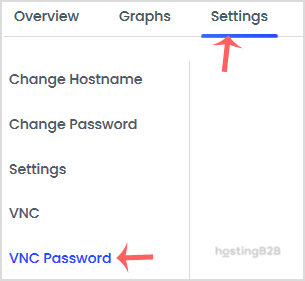
4. Click on the Settings tab, and under the settings tab, click on VNC Password.
Lock VNC down, then keep the VPS on a plan you control. Plans start at €30.00/month, with full root access and a dedicated IP.
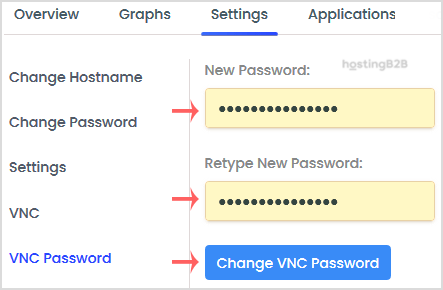
5. Enter your new password, and click on Change VNC Password.

Have a question about VNC passwords in Virtualizor? Chat with HostingB2B support on Telegram.
6. Reboot your VPS, and then you can access your VNC using the new password.
Get a VPS with Virtualizor VNC included
Choose a live KVM VPS plan with root access and Virtualizor VNC, or talk to us about the right size for your workload.
Visit our blog for more knowledgebase articles !
The post Change the VNC password in Virtualizor appeared first on HostingB2B.