
If you have previously enabled rescue mode in Virtualizor but did not know how to disable it, follow this tutorial.
Turn rescue mode off from Virtualizor when the VPS is ready. HostingB2B VPS hosting includes Virtualizor on the plans that use it, so you can disable rescue mode and boot the server normally.
1. Log in to your Virtualizor Control Panel.
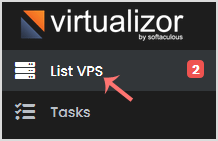
2. In the left side panel, click on List VPS.

3. Hover your mouse on the appropriate VPS, and that line will be highlighted. Then click on the Manage icon in the highlighted line.

Have a question about Virtualizor rescue mode? Chat with our support team on Telegram.
4. Click on the Rescue Mode tab.

Prefer WhatsApp? Chat with HostingB2B about Virtualizor rescue mode.
5. Click Disable Rescue Mode.

Run the VPS with HostingB2B
Review HostingB2B VPS hosting, or talk to us about a plan with Virtualizor if you need rescue mode and normal boots from the panel.
Your VPS will start in normal mode.
Visit our blog for more knowledgebase articles !
The post Disable rescue mode in Virtualizor appeared first on HostingB2B.