You can turn two-factor authentication off in cPanel. HostingB2B web hosting includes cPanel, so you can manage two-factor authentication from the same control panel you use for the site.
If you want to remove the Two-Factor Authentication from your cPanel account, follow this instruction. This feature is available on all our web hosting plans.
1. Firstly log into your cPanel account.
Have a question about turning off two-factor authentication in cPanel? Chat with our support team on Telegram.
2. Secondly in the Security section, click on the Two-Factor Authentication Icon.

3. Then click on the Remove Two-Factor Authentication button.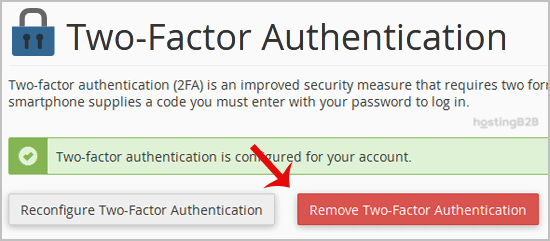
4. Finally for confirmation, click on Remove.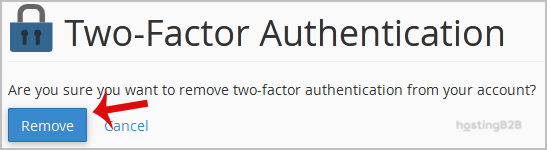
After that you will see a message like Success: The system removed the two-factor authentication from your account.
Prefer WhatsApp? Chat with HostingB2B about turning off two-factor authentication in cPanel.
Important: We strongly recommend keeping 2FA enabled for security. If you need to re-enable it, see our guide on enabling two-factor authentication.
Host the site with HostingB2B
Review HostingB2B web hosting, or talk to us about a cPanel plan if you need help with account security settings.