Managing PHP error visibility is a critical task for any website owner or developer. You may need to enable the display_errors directive to debug code effectively, or disable it to protect your live website from security vulnerabilities. This guide provides a straightforward method to enable or disable PHP display_errors in Plesk using the CloudLinux PHP Selector.
Why Manage PHP Error Display Settings
Controlling the display_errors setting serves two distinct but equally important purposes. During development or troubleshooting, enabling this feature allows PHP to print errors directly to the browser screen. This provides immediate feedback to help you identify and fix bugs. Conversely, on a production server, displaying errors can expose sensitive information about your server configuration, file paths, and database structure, creating a significant security risk. Therefore, it is essential to disable this setting on any live website.
Prerequisites Before You Begin
Before proceeding, it is important to ensure your domain is using a non-native PHP version. The CloudLinux PHP Selector options are only available for these versions. If you attempt to access the options menu while using a native version, you may encounter an error. If needed, you can easily change the PHP version in Plesk before continuing with the steps below.

Steps to Change display_errors in Plesk
Follow these simple steps to toggle the setting within your Plesk control panel. This process gives you direct control over your site’s error reporting behavior.
- Log in to your Plesk account to access your hosting control panel.
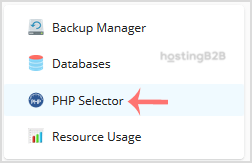
- In the right-hand sidebar of the main dashboard, locate and click on PHP Selector.
- Inside the PHP Selector interface, click on the Options tab to view the configurable PHP settings.

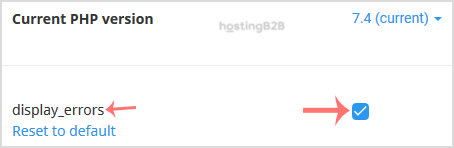
- Find the display_errors directive in the list. To enable it for debugging, check the box next to it. To disable it for security, uncheck the box. The change is saved automatically.
Key Security Best Practices for Error Reporting
While enabling errors is useful for development, you should always disable them on a live site. Publicly visible errors can be exploited by malicious actors to gather information about your system. For comprehensive protection, consider implementing robust Web Application Security (WAF) protection and follow established guidelines to improve your website security posture.
Frequently Asked Questions
The display_errors directive is a core PHP setting that determines whether error messages are printed to the screen as part of the web page output. It is intended for development purposes and should be turned off in a production environment.
Displaying PHP errors on a live website can reveal sensitive information to attackers. This includes database connection details, server file paths, and fragments of your source code, which can be used to plan and execute attacks against your application.
If you see an error related to the native PHP version when accessing the Options menu, it means you need to switch your domain to a non-native version first. You can do this within the main screen of the CloudLinux PHP Selector by choosing a different version from the dropdown list.
No, the settings configured via the CloudLinux PHP Selector are specific to the domain you are managing. You will need to configure the display_errors setting individually for each website subscription in your Plesk account.
Yes, the recommended practice for production environments is to disable display_errors and enable error logging instead. This writes errors to a private log file on the server, allowing you to review them securely without exposing any information to visitors.