The Plesk control panel offers several interface views designed to match different user workflows and preferences. Knowing how to change the view mode in Plesk allows you to customize your dashboard for maximum efficiency. This guide provides a straightforward tutorial on switching between the available layouts in just a few clicks.
Understanding Plesk View Modes
Before making a change, it is helpful to understand the primary options available. Each Plesk interface view organizes tools and information differently, catering to specific needs. Choosing the right one can significantly streamline your website management tasks.
- Dynamic List This modern view presents a clean, card-based layout with essential tools for each domain. It is often preferred for its simplicity and focus on core website management functions.
- Active List This view provides a more detailed list of your websites and includes resource usage statistics like disk space and traffic directly on the main screen. It is useful for monitoring multiple sites at a glance.
- Classic List A more traditional table-based layout, the Classic List view displays all domains in a compact format. This view is favored by users managing a large number of domains who need to see extensive information in one place.
How to Switch Your Plesk View
The process for changing your Plesk view mode is simple but varies slightly depending on your current setting. Follow the steps below to adjust your Plesk UI settings to your preferred layout.

- First, you need to login to Plesk using your account credentials. The URL is typically your domain name followed by port 8443.
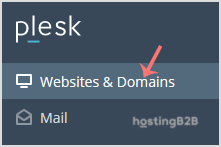
- From the main navigation sidebar on the left, select the Websites & Domains section to see a list of your managed sites.

- The next step depends on which view is currently active. Find the instructions below that match your current interface.
From the Dynamic List View
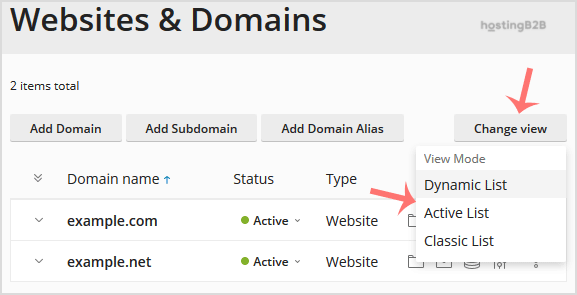
If your Plesk interface uses the modern card layout, look for the Change View button on the upper right side of the screen. Clicking this button will open a menu where you can select either Active List or Classic List mode.
From Active or Classic List View
If your interface is already in a list format (Active or Classic), you will not see the “Change View” button. Instead, locate and click the small Wrench icon on the right side of the page header. This will reveal the layout options, allowing you to switch to your desired view mode.
Customizing your control panel is a key part of managing your secure Web Hosting environment effectively. For a deeper comparison of popular control panels, see our guide on Plesk vs cPanel.
Frequently Asked Questions
The default view mode can vary depending on the hosting provider’s configuration. However, the Dynamic List view is often the default on newer Plesk installations due to its user-friendly interface.
Yes, you can switch between view modes at any time. Simply follow the same steps outlined in this guide to select a different layout whenever you need to.
The Dynamic List view is generally considered the most beginner-friendly option. Its clean, uncluttered layout focuses on the most common tasks, making it easier for new users to navigate and manage their websites.
No, changing the Plesk view mode is purely a cosmetic change to the control panel interface. It does not alter your website’s files, configurations, or performance in any way.
If you do not see the “Change View” button, it means you are currently in either the Active List or Classic List mode. To change your view from here, you must click the Wrench icon instead.