
A guide to help you create a new database user in DirectAdmin. Managing separate database users with unique credentials is a security best practice for any web hosting environment.
1. Firstly log in to your DirectAdmin Account.
2. Following that in the Account Manager section, click on the MySQL Management icon or type MySQL Management in the navigation filter box. The option will appear. Click on it.

3. Then under database text, click on the database for which you want to create a user.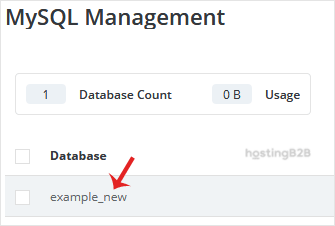
4. Under Users, click on Create New User.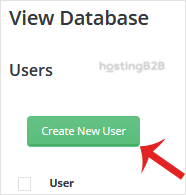
5. After that enter a user in the username field and a password in the password field or use the generate new password icon to generate a random password. Then click on Create.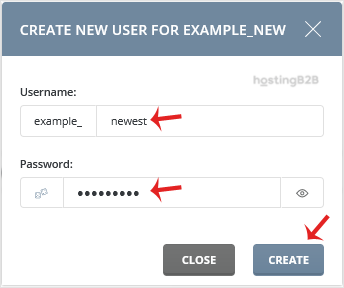
Note: A new database user will be created, and you can copy its details in a safe place.
You have successfully created a new database user in DirectAdmin. If you haven’t created a database yet, see our guide on how to create a database in DirectAdmin. For database optimization and maintenance, learn how to examine and optimize your databases. To secure your database connections, install an SSL certificate for encrypted data transmission.








