

A simple guide to help you delete a database in cPanel. Database management is a core feature of our web hosting plans.
1. First log into your cPanel account.
2. Then in the Databases section, click on MySQL Databases Icon.


3. Under Current Databases, you can see a list of all your databases. Locate the Database you wish to remove and then click on the Delete icon.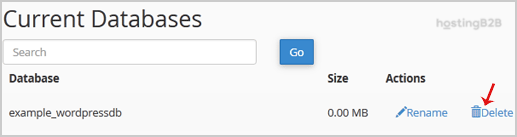
4. Finally click on the Delete Database button.
You have successfully deleted a database in cPanel. Before deleting, we strongly recommend exporting the database first as a backup. To create a new database, follow our database creation guide. For automated backup protection, consider Acronis Cyber Protect.








