
You can download your database from DirectAdmin. It can be useful for backup purposes or other uses. Regular database backups are essential for any web hosting environment.
1. Log in to your DirectAdmin Account.
2. In the Account Manager section, click on the MySQL Management icon or type MySQL Management in the navigation filter box. The option appears. Click on it.

3. Under database text, you can see a list of your databases. On your database, you will see a plus (+) icon, displayed on the right side. Click on it and select Download as SQL or GZ.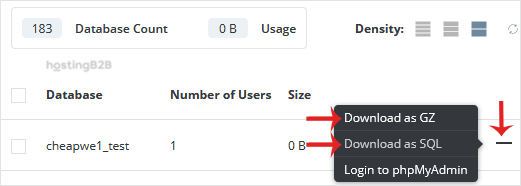
4. It will prompt for a download, which you will be able to save to your computer.
You have successfully downloaded a database in DirectAdmin. For automated, encrypted backups with ransomware protection, consider Acronis Cyber Protect which handles database and file backups on a schedule. To manage your databases further, learn how to create a new database or optimize an existing database in DirectAdmin.








