Managing your Web Host Manager environment efficiently sometimes requires removing outdated or unused configurations. This WHM feature list removal guide provides a direct, step-by-step process to help you safely delete a feature list you no longer need, ensuring a clean and organized hosting setup.
Understanding WHM Feature Lists
In WHM, a feature list is a collection of cPanel functions that you can enable or disable for a specific hosting package. This allows you to create tiered hosting plans with different capabilities. Removing a list that is no longer part of your offerings helps streamline your package management and prevents accidental assignment of obsolete feature sets.
Important Pre-Deletion Check
Before you remove a feature list from WHM, it is critical to verify it is not currently assigned to any active hosting packages. Deleting a feature list that is in use can cause inconsistencies and potential issues for the cPanel accounts using that package. Always review your package configurations first to avoid service disruptions.

How to Delete a WHM Feature List
Follow these simple steps to permanently delete a feature list from your WHM interface. This process is straightforward but irreversible, so proceed with certainty.
- Log in to your WHM Account
First, you need to securely Access Web Host Manager (WHM) with your administrator credentials. - Navigate to the Feature Manager
In the main menu or search bar on the left, find and select “Feature Manager”. This is located under the “Packages” section.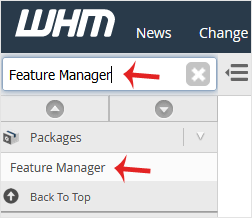
- Select the Feature List to Remove
Under the “Manage feature list” heading, use the dropdown menu to choose the specific feature list you intend to delete.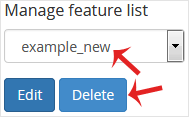
- Click the Delete Button
Once you have selected the correct list, click the “Delete” button. WHM will ask for confirmation before permanently removing the list. After you confirm, the feature list will be successfully removed.
Properly managing these settings is a key part of delivering reliable Reseller Hosting with WHM & cPanel. For more advanced configurations, you may also need to create a new Feature list in WHM to define new service tiers.
Frequently Asked Questions
A feature list in WHM is a saved configuration that defines which cPanel tools and functions are available to users. Administrators assign these lists to hosting packages to create different levels of service for their clients.
If you delete a feature list assigned to an existing hosting package, it can lead to unpredictable behavior for the cPanel accounts using that package. It is essential to reassign the package to a different feature list before deleting the old one.
No, deleting a feature list in WHM is a permanent action. You cannot restore it automatically. You would need to manually recreate the list and re-select all the desired features.
You can see this information in WHM by navigating to “Edit a Package”. As you select each package, it will display the feature list currently assigned to it. You should review all packages before deleting a list.
A package defines resource limits like disk space and bandwidth, while a feature list defines the available cPanel tools. You must create or add a hosting package in WHM and assign a feature list to it to create a complete hosting plan.