EggBlog is a straightforward and lightweight PHP-based blogging platform perfect for users who need a simple yet effective way to publish content. This guide provides a complete walkthrough to help you install EggBlog on your hosting account using the Softaculous auto-installer directly within your SiteWorx control panel.
Step-by-Step EggBlog Installation Guide
Installing EggBlog is a streamlined process with Softaculous. Follow these detailed steps carefully to ensure a successful setup. The entire process should only take a few minutes to complete from start to finish.

Accessing the Softaculous Installer
First you need to navigate to the Softaculous application library from your main SiteWorx dashboard.
- Begin when you log into your SiteWorx account. The URL is typically your domain name followed by port 2443.
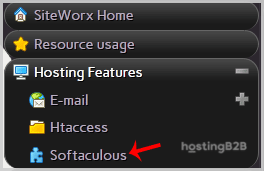
- From the main SiteWorx Menu find the Hosting Features section. If it is not already open click to expand it.
- Click on the Softaculous option to launch the auto-installer. SiteWorx will open the main Softaculous Interface in a new window or tab.

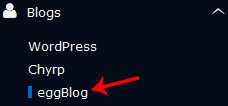
- In the navigation panel on the left side of the screen locate and click on the Blogs category.
- A list of available blogging applications will appear. Find and click the EggBlog link.
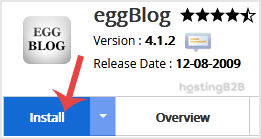
- On the EggBlog overview page click the prominent Install button to begin the setup process.
Configuring Your EggBlog Installation
Next you will define where the software should be installed and provide some basic details about your new website.
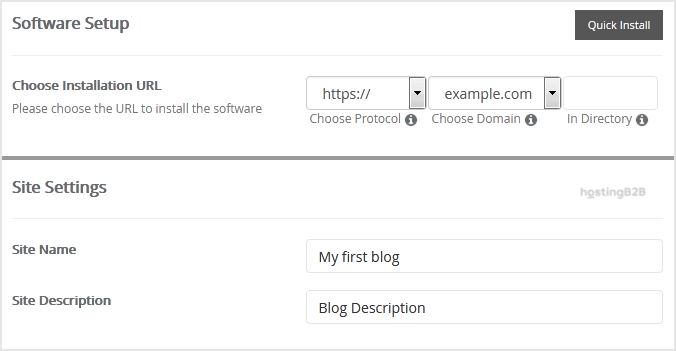
- Under the Software Setup heading configure the installation URL.
- Choose Installation URL Select the correct protocol (http or https) and domain name from the dropdown menus.
- In Directory To install EggBlog in a subfolder like `example.com/blog` enter the folder name here. To install it on your main domain leave this field empty.
- Move to the Site Settings field to enter your website’s identity.
- Site Name Enter a descriptive name for your website.
- Site Description Provide a brief description of your site’s purpose.
Creating Your Administrator Account
This step is critical for securing your new blog. You will create the primary user account for managing your EggBlog site.
- In the Admin Account section provide the following details.
- Username Choose a unique username. For security do not use generic names like “admin” or “administrator”.
- Password Create a strong and complex password. Use a mix of uppercase letters lowercase letters numbers and symbols.
- Email Enter your primary email address. This will be used for notifications and password resets.
Important Note Be sure to copy your new admin username and password and store them in a secure location. You will need these credentials to access your EggBlog dashboard.
- Under Choose Language you can select the default language for your EggBlog installation. English is selected by default.
Finalizing the Installation
The final steps involve advanced options and starting the installation script. For most users the default settings are appropriate.
- Review the Advanced Options section. You can leave these settings as they are unless you have a specific need to change the database name or configure automated backups. Be aware that frequent backups can consume significant disk space which might require a more scalable hosting environment over time.
- Scroll to the bottom of the page and click the final Install button.
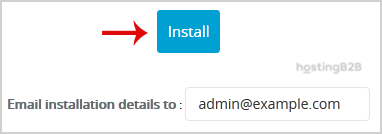
Softaculous will now process the installation. Once complete you will see a success message confirming that EggBlog has been installed on your account.
Post-Installation First Steps
Congratulations on your new EggBlog installation. Your immediate next step is to log into the administrative dashboard. You can typically access the login page by adding `admin.php` to your EggBlog URL for example `yourdomain.com/admin.php`. Use the administrator username and password you created during the setup process to log in. Once inside you can start writing posts adjusting settings and customizing the appearance of your new blog.
Troubleshooting Common Installation Issues
While Softaculous makes installation simple issues can occasionally arise. If you encounter an error message check for incorrect database details in the advanced options or file permission problems in the target directory. Sometimes an installation can fail if a previous version of the software exists in the same location. If you continue to experience problems our expert support team is available to assist you. You may also find our other other blogging platform installation guides helpful for comparison.
Frequently Asked Questions
EggBlog is a lightweight and simple blogging application written in the PHP programming language. It is designed for users who want a straightforward platform for publishing content without the complexity of larger content management systems.
No technical skills are required. Softaculous is an auto-installer that automates the entire process. You only need to follow the on-screen instructions and fill in basic details like your site name and desired admin credentials.
The location depends on the ‘In Directory’ field during setup. If you left it blank EggBlog is installed in your domain’s main public_html folder. If you entered a name like ‘blog’ it will be located in a subfolder at public_html/blog.
You can access the admin login page by navigating to yourdomain.com/admin.php. Use the username and password you created in the ‘Admin Account’ section during the installation process.
Moving an application after installation is a complex process that can break your website. It is best to decide on the correct directory before you begin. If you must move it you would need to perform a fresh installation in the new location and manually migrate your content.
If the Softaculous installation fails first check the error message for clues. Common issues include incorrect paths or existing files in the destination directory. You can try deleting the directory and running the installer again. If the problem persists please contact our support team for assistance.