Launching a new blog should be a straightforward process. If you are looking for a simple yet effective PHP-based blogging platform, eggBlog is an excellent choice. This guide provides a complete walkthrough to help you install eggBlog using the Softaculous Apps Installer directly within your cPanel account, streamlining the entire setup from start to finish.
Getting Started with eggBlog and Softaculous
Before beginning the installation, it helps to understand the tools you will be using. EggBlog is a lightweight content management system designed for simplicity and ease of use, making it ideal for personal blogs. Softaculous is a powerful script installer included with many Web Hosting services that automates the installation of hundreds of web applications, saving you time and preventing manual configuration errors. By using them together, you can get your website online quickly and efficiently.
Step-by-Step eggBlog Installation Guide
This eggBlog CMS setup tutorial will guide you through every necessary action inside your hosting control panel. Follow these instructions carefully to ensure a smooth and successful installation.

1. Access the Softaculous Apps Installer
First, you need to navigate to the Softaculous area within your cPanel account. This is where all automated installations are managed.
- Log into your cPanel account.
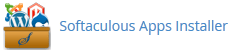
- Scroll to the Software section and click the Softaculous Apps Installer icon.

- You will be redirected to the main Softaculous dashboard.
2. Locate the eggBlog Application
Softaculous organizes applications by category. You will find eggBlog listed under the blogging section.
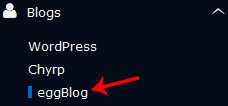
- In the navigation menu on the left, find and expand the Blogs category.
- Click on the eggBlog link that appears in the list.
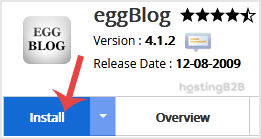
- On the eggBlog overview page, click the Install button to begin the setup process.
3. Configure Software Setup Options
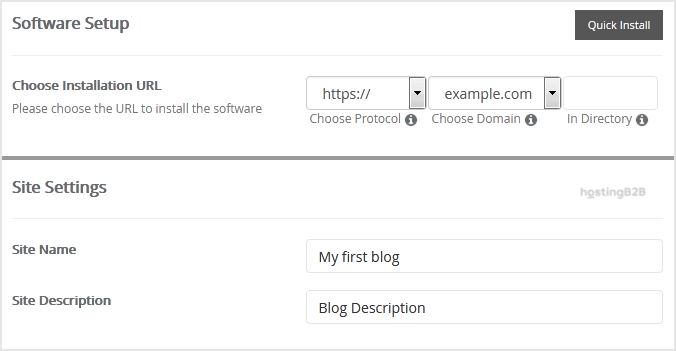
This section defines where and how eggBlog will be installed on your domain. Pay close attention to these settings to avoid installing it in the wrong location.
- Choose Installation URL – Select the correct protocol (http or https) and your desired domain name from the dropdown menus. We strongly recommend using https for security.
- In Directory – This field is important. To install eggBlog on your main domain (e.g. example.com), leave this field empty. To install it in a subfolder (e.g. example.com/blog), enter the directory name here.
4. Define Your Site Settings
Next, you will provide the basic information that identifies your new blog to visitors and search engines.
- Site Name Enter a name for your website. This will be visible to your visitors.
- Site Description Add a short description of your website’s purpose.
5. Create Your Administrator Account
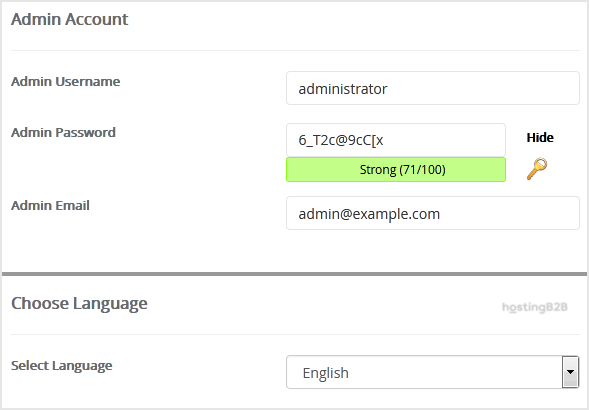
Here you will create the login credentials for managing your eggBlog installation. For security, it is critical to use strong and unique details.
- Username Choose a username for your admin account. Avoid common names like “admin” or “administrator” to improve security.
- Password Create a strong, unique password. Use a combination of letters, numbers, and symbols.
- Email Enter your primary email address. This will be used for notifications and password resets.
Important Note Be sure to copy your new admin username and password and store them in a secure location. You will need them to log into your eggBlog dashboard after the installation is complete.
6. Select Your Language
Finally, you can choose the default language for the eggBlog interface. English is selected by default, but you can change it if needed.
- Choose Language Select your preferred language from the dropdown list.
Finalizing Your Installation
Once you have completed all the configuration fields, you are ready to execute the installation. The advanced options can typically be left at their default settings unless you have a specific need to change the database name or backup settings.
- Scroll to the bottom of the page.
- Click the Install button.
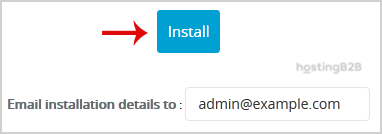
Softaculous will now automate the installation process. Once it is finished, you will see a confirmation message with links to your new eggBlog website and its admin login page. Congratulations, you have successfully installed eggBlog.
After the Installation Your Next Steps
With eggBlog installed, your journey is just beginning. You can now log into your admin dashboard using the credentials you created and start publishing content. If you are exploring different platforms, you might also be interested in learning how to install WordPress via Softaculous, another popular option available through the installer.
Frequently Asked Questions
EggBlog is a lightweight and simple open-source blogging platform written in PHP. It is designed to be easy to set up and manage, making it a great choice for users who want a straightforward blog without the complexity of larger content management systems.
Softaculous is included for free with most web hosting plans that use cPanel. It provides a one-click installation process for hundreds of popular web applications, including eggBlog.
Yes. During the Softaculous installation process, you will see an “In Directory” field. If you want your blog to be accessible at a URL like yourdomain.com/blog, simply enter “blog” into this field. If you leave it blank, eggBlog will be installed on your main domain.
If the installation fails, first check for any error messages provided by Softaculous. Common issues can include incorrect directory permissions or database connection problems. Review your settings and try again. If the problem persists, contact your hosting support team for assistance.
Softaculous simplifies updates. When a new version of eggBlog is available, you will typically receive a notification in your cPanel or Softaculous dashboard. You can then update the application with just a few clicks directly from the installer’s interface.