If you want to check your SolusVM VPS status and determine whether the VPS is offline or online, you can find out from the client area or from the SolusVM Control Panel. SolusVM is included with all our VPS hosting plans.
1. Login to your SolusVM Control Panel.
2. If you have multiple VPS, select the appropriate one.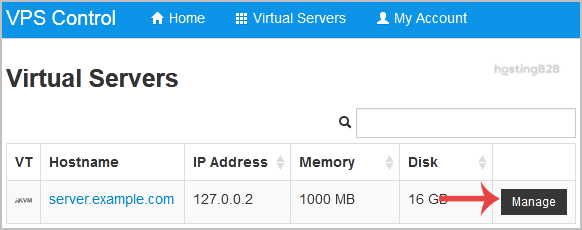

3. Under your VPS hostname. You can see the VPS details. Then check Status, and If your VPS is offline, it will show Offline. If the VPS is online, it will show Online or Unavailable.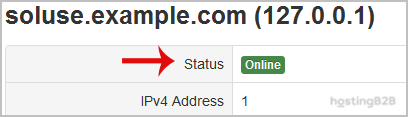
If your VPS shows as offline and you need it started, see our guide on how to boot your VPS using SolusVM. For 24/7 monitoring and automatic restarts, consider our managed services.