A simple guide to help you remove a subdomain in cPanel.
1. First log into your cPanel account.
2. After that go to the Domains section, click on Subdomains Icon.


3. Then under the Modify a Subdomain list you can see a list of subdomains.
4. Following this you can now click the Remove option under the Actions tab.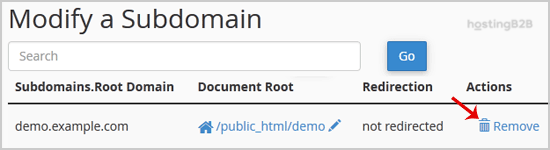
5. Finally you will receive a warning that you are removing a subdomain.example.com. Click on the Delete Subdomain button to remove your subdomain permanently.
You have successfully removed your subdomain via cPanel.
Visit our blog for more knowledgebase articles !
The post How to Remove a Subdomain in cPanel? appeared first on HostingB2B.