
Removing unused subdomains helps keep your web hosting environment clean and reduces potential security exposure. Before deleting, make sure to back up any content hosted on the subdomain — consider using Acronis Cyber Protect for automated backups.
1. Log in to your Plesk account.
2. In the Sidebar Menu, click on Websites & Domains.


3. Under Domain Name, you can see your domain list. Click on the More icon  Delete Subdomain.
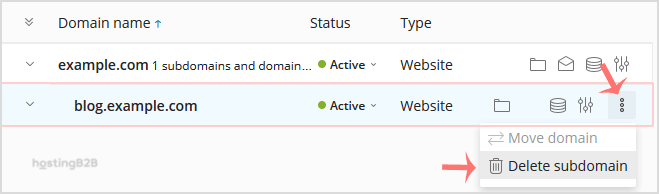
4. A confirmation box will appear. Click Yes to remove your subdomain.
For related Plesk management tasks, see how to add a subdomain, redirect a subdomain, or remove a subdomain redirect in Plesk.








