Removing an unused or obsolete subdomain from your DirectAdmin control panel is a straightforward process that helps maintain a clean domain structure and enhances security. This guide provides clear, actionable steps to safely delete a subdomain, explains the critical options you will encounter, and offers solutions for common issues.
Important Considerations Before Deletion
Before you proceed with subdomain removal, it is vital to understand the implications. Deleting a subdomain is a permanent action. If the subdomain hosts a live website, application, or important files, this process will make them inaccessible. We strongly recommend you generate a full backup of your DirectAdmin account to prevent accidental data loss. This ensures you can restore the data if needed.
Step-by-Step Guide to Remove a Subdomain
Follow these instructions carefully to delete a subdomain from your hosting account. This process gives you direct control over your domain portfolio, which is essential for managing complex environments often found on dedicated servers.

- Log in to DirectAdmin
First, access your DirectAdmin control panel using your secure login credentials provided by your hosting provider. - Navigate to Subdomain Management
Once logged in, locate the Account Manager section. Click the Subdomain Management icon. Alternatively, you can type “Subdomain” into the navigation filter box at the top of the page to quickly find and select the option.
- Select the Subdomain to Remove
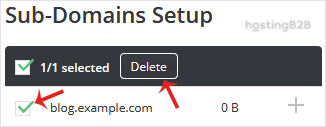
You will see a list of all existing subdomains associated with your account. Find the specific subdomain you wish to delete and select the checkbox next to its name. - Confirm the Deletion
With the correct subdomain selected, click the Delete button. A confirmation prompt will appear with a critical choice.

- Remove Directory Content Check this box if you want to permanently delete all files and folders associated with the subdomain from the server. This is the most common choice for completely removing an old site.
- Leave Directory Content If you leave this box unchecked, only the subdomain DNS entry will be removed. The files and folders will remain on your server, but they will no longer be accessible via the subdomain URL.
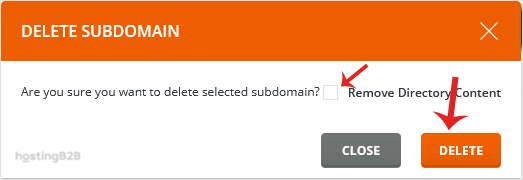
After making your selection, click the final Delete button to complete the process. If you are also cleaning up associated services, you may need to delete a database in DirectAdmin that was used by the subdomain’s application.
Troubleshooting Common Issues
Occasionally, you might encounter an issue during the subdomain removal process. Here are a few common problems and their solutions.
- Permission Denied Error If you see a permissions error, it typically means your user account does not have the necessary privileges. Contact your hosting administrator to resolve this.
- Subdomain Still Appears After deletion, DNS changes can take some time to propagate. If the subdomain still resolves in your browser, try clearing your browser cache and your local DNS cache.
- Accidental Deletion If you deleted a subdomain by mistake and did not have a backup, contact your support team immediately. While recovery is not guaranteed, they may be able to help from server-level backups.
Frequently Asked Questions
When you remove a subdomain, the DNS record that points it to your server is deleted. This means visitors can no longer access it via their browser. If you also choose to remove the directory content, all associated website files and folders are permanently deleted from your web hosting account.
Yes, the action is permanent. Once a subdomain and its contents are deleted, they cannot be easily recovered unless you have a recent backup. You can always recreate the subdomain later by following the guide on how to add a subdomain in DirectAdmin, but the original files will be gone.
You should check this box if your goal is to completely get rid of the subdomain and its associated website or application to free up disk space and clean your domain structure. If you might need the files later or want to point a different domain to them, you should leave the box unchecked and manually back up the files before deleting the subdomain entry.
No, removing a subdomain will not impact your main domain or any other subdomains. The process is isolated to the specific subdomain you select for deletion.
The removal from your DirectAdmin panel is instant. However, due to DNS propagation, it may take a few hours for the change to be reflected across the entire internet. During this time, some users might still be able to access the old content from their local cache.