Managing your domain settings is a critical task for website administration. If you no longer need an additional domain to point to your main website, you must remove the domain alias in DirectAdmin. This guide provides a clear, step-by-step process to help you delete a domain alias safely and effectively, ensuring your hosting configuration remains clean and organized.
Understanding Domain Aliases in DirectAdmin
A domain alias, often called a domain pointer, is a domain name that forwards visitors to your primary website. For example, if your main site is `yourprimarydomain.com`, you could set up `youraliasdomain.net` as an alias. Anyone visiting the alias domain would see the exact same content as your main site. This is useful for branding, marketing campaigns, or capturing common misspellings of your primary domain. However, you may need to remove an alias if you plan to use that domain for a different project or simply wish to streamline your setup.
Before You Delete an Alias – Important Steps
Before you remove a domain alias, it is vital to understand the consequences. Once deleted, the alias domain will no longer point to your main website and any associated email forwarders may stop working. We strongly recommend you generate and download a full backup of your DirectAdmin account as a precaution. This ensures you can restore your settings if you make a mistake or change your mind.

Step-by-Step Guide to Remove a Domain Alias
Follow these instructions carefully to delete a domain pointer from your DirectAdmin account. The process is straightforward and can be completed in just a few clicks from the account manager dashboard.
- Log in to your DirectAdmin Account
First, access your DirectAdmin control panel using your secure login credentials. - Navigate to Domain Pointers
In the main dashboard, locate the Account Manager section. Click on the Domain Pointers icon. If you cannot see it immediately, you can type “Pointers” into the navigation filter box to quickly find the option, then click on it.
- Select the Domain Alias to Remove
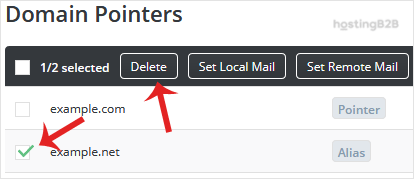
You will now see a list of all configured domain pointers. Carefully review the list and find the specific domain alias you wish to delete. Select it by clicking the checkbox next to its name. - Confirm the Deletion
With the correct domain alias selected, click the Delete button. DirectAdmin will ask for confirmation to prevent accidental removal. Confirm the action to permanently remove the domain alias.

After completing these steps, you have successfully removed the domain alias. The domain will no longer be associated with your main website through DirectAdmin.
Troubleshooting Common Issues
Sometimes you might encounter an issue during the domain alias removal process. Here are a few common problems and their solutions.
- The alias still directs to my site DNS changes can take some time to propagate across the internet. If the domain still points to your site after deletion, try clearing your browser cache and waiting a few hours.
- I cannot find the Domain Pointers option Your hosting plan or user permission level might not include this feature. If you believe this is an error, please contact your hosting support team for assistance.
- I deleted the wrong alias If you have a recent backup, you can restore it. Otherwise, you will need to create a domain alias again with the correct settings.
Frequently Asked Questions
A domain alias (or pointer) is a completely different domain name that shows the same content as your primary domain. A subdomain is a prefix added to your primary domain (e.g., `blog.yourdomain.com`) that can host entirely separate content. You can learn how to remove a subdomain if that is what you need.
No, removing a domain alias has no impact on the files, databases, or performance of your primary domain. It only removes the link that made the alias domain point to your main site.
Yes, you can add the domain alias again at any time, provided you still own the domain name and your hosting plan supports it. The process is similar to creating a new alias.
When you delete a domain alias, any email forwarders or accounts associated with that specific domain name will stop working. Be sure to migrate any important email configurations before removing the pointer.
Common reasons include selling the alias domain, using it for a new and separate website, or simplifying your hosting account by removing unused domains. For new projects, you may need our reliable web hosting or domain registration and transfer services.